
Плагин дает возможность быстро создать маску для номера телефона +7(___)__-__-__, даты, номера кредитной карты и т.д.
Данная статья — перевод документации по Maskedinput на GitHub с расширеными примерами использования.
Маска определяется форматом, состоящим из литералов маски и определений маски. Любой символ, отсутствующий в списке определений ниже, считается литералом маски. Литералы маски будут автоматически вводиться для пользователя по мере их ввода и не могут быть удалены пользователем. Предопределены следующие стандартные обозначения:
9— любая цифра[0-9]a— любой символ латинского алфавита[A-Za-z]*— цифра или символ латинского алфавита[A-Za-z0-9]- Дополнительно можно определить свои
Подключение файлов
Файлы, необходимые для работы плагина (Версия jQuery 1.8.3+):
<script src="https://cdn.jsdelivr.net/npm/jquery@3.2.1/dist/jquery.min.js" type="text/javascript"></script>
<script src="https://cdn.jsdelivr.net/npm/jquery.maskedinput@1.4.1/src/jquery.maskedinput.min.js" type="text/javascript"></script>
Примеры использования jQuery.Maskedinput
Обратите внимание, что во всех примерах на этом сайте подключен мини-плагин для решения проблемы с кликом по центру (см. последний раздел статьи)
Базовые примеры
Вызовите функцию mask для тех элементов, к которым вы хотите применить маску. Никаких дополнительных вызовов функции прописывать не нужно.
-
Маска для даты
$("#date_1").mask("99/99/9999"); -
Маска номера телефона
$("#phone_1").mask("(999) 999-9999"); -
Маска для банковской варты
$("#card").mask("9999-9999-9999-9999");
Продвинутое использование плагина
Маска для ввода номера телефона
Разберем разные варианты кастомизации
Добавление +7, или кода региона (оператора), содержищего девятки 9
-
Маска для телефона с фиксированным префиксом «+7»
$("#phone_2").mask("+7(999) 999-9999"); -
Маска для телефона с фиксированным префиксом «8»
$("#phone_3").mask("8(999) 999-9999"); -
Переопределение стандартных обозначений для указания номера с фиксированной девяткой, например код оператора
$.mask.definitions['9'] = false;
$.mask.definitions['5'] = "[0-9]";
$("#phone_4").mask("8(921) 555-5555");
Отключение автозаполнения
Чтобы гарантированно отключить автозаполнение применяйте технику, описанную в моей заметке.
Дополнительная кастомизация
-
Заменить подчеркивание плэйсхолдера
_на другой символ$("#model").mask("9999_999",{placeholder:"-"}); -
Отключить стирание при незаполненных данных
По-умолчанию, если поле ввода теряет фокус до того как будет заполненно пользостью, данные стираются. Это поведение можно отключить:
$("#product_2").mask("9999/999/99",{autoclear: false}); -
Сделать часть маски не обязательной
Вы можете иметь часть вашей маски не обязательной. Перечислено после ‘?’ внутри маски считается необязательным. Типичным примером этого является номер телефона и дополнительный добавочный номер.
$("#phone_dob").mask("8(999) 999-9999? доб.9999"); -
Переопределить стандартные обозначения
Если вам не достаточно стандартных обозначений (
9— цифра,a— лат. буквы,*— цифры или лат. буквы), вы всегда можете добавить свои. Например, может быть, вам нужна маска, чтобы разрешить только шестнадцатеричные символы ([A-Fa-f0-9]), или только+-. Вы можете добавить свое собственное определение для заполнителя, скажем, «h». Обратите внимание, что вы можете указать любое регулярное выражение.$.mask.definitions['h'] = "[A-Fa-f0-9]"; $("#color").mask("#hhhhhh"); $.mask.definitions['~']='[+-]'; $("#eyescript").mask("~9.99 ~9.99 999"); -
Вызвать функцию после заполнения поля ввода
$.mask.definitions['h'] = "[A-Fa-f0-9]";
$("#bgcolor").mask("#hhhhhh",{
  completed: function(){
    this.css('background-color'+this.val());
  }
});
Решение проблемы с кликом по центру
Один из минусов плагина в том, что если кликнуть по центру маски, то курсор может там и остаться. Это неприятная проблема, но решается с помощью миниатюрного плагина.
jQuery-плагин для установки курсора в определенной позиции pos:
$.fn.setCursorPosition = function(pos) {
  if ($(this).get(0).setSelectionRange) {
    $(this).get(0).setSelectionRange(pos, pos);
  } else if ($(this).get(0).createTextRange) {
    var range = $(this).get(0).createTextRange();
    range.collapse(true);
    range.moveEnd('character', pos);
    range.moveStart('character', pos);
    range.select();
  }
};
Добавляем обработчик на поле ввода и затем ставим маску. Цифра при вызове .setCursorPosition(3) указывает на позицию, в которой должен быть поставлен курсор:
-
Курсор всегда в начале
$("#center_ok").click(function(){
  $(this).setCursorPosition(3);
}).mask("+7(999) 999-9999");
$("#center_not_ok").mask("+7(999) 999-9999");
Современная альтернатива плагину
jQuery.Maskedinput был протестирован в Internet Explorer, Firefox, Safari, Opera и Chrome и весьма популярен даже в 2020 году. Однако стоит признать, что он хоть и выполняет свои функции, но все таки морально устарел (последний коммит в репозиторий был сделан в 2015 году). Основным преимуществом плагина является быстрота подключения и настройки.
Для тех, кто готов разобраться с библиотекой, которая «из коробки» не дружит с jQuery рекомендую Cleave.js. А в этом топике обсуждается как прикрутить ее к jQuery.
Маски ввода для текстовых полей
Применение масок ввода у полей форм значительно упрощает их использование, уменьшает количество ошибок и приводит отправленные данные к единому формату.
Маски для полей легко сделать с помощью jQuery плагина Masked input plugin.
Подключение:
<script src="/js/jquery.min.js"></script>
<script src="/js/jquery.maskedinput.min.js"></script>
HTML
1
Номер телефона
Мобильные, Москва, МО и Санкт-Петербург.
<input type="text" class="mask-phone form-control" placeholder="Номер телефона">

<script>
$('.mask-phone').mask('+7 (999) 999-99-99');
</script>
HTML
Данная маска иногда вызывает потерю клиента, некоторые люди не видят +7 и пишут 8903… в итоге теряется последняя цифра телефона. Лучше использовать другую маску c блокировкой первой цифры 8:
$.mask.definitions['h'] = "[0|1|3|4|5|6|7|9]"
$(".mask-phone").mask("+7 (h99) 999-99-99");
JS
2
Дата и время
DD.MM.YYYY (25.10.2017)
$('.mask-date').mask('99.99.9999');JS
DD.MM.YYYY hh:mm (25.10.2017 18:25)
$('.mask-date').mask('99.99.9999 99:99');JS
YYYY-MM-DD (2017-10-25)
$('.mask-date').mask('9999-99-99');JS
YYYY-MM-DD hh:mm (2017-10-25 18:25)
$('.mask-date').mask('9999-99-99 99:99');JS
3
Банковская карта
Номер карты
$('.mask-card-number').mask('9999 9999 9999 9999');JS
Срок действия
$('.mask-card-date').mask('99/99');JS
CVV2/CVC2
$('.mask-card-code').mask('999');JS
4
Паспорт
Серия, номер
$('.mask-pasport-number').mask('99-99 999999');JS
Код подразделения
$('.mask-pasport-division').mask('999-999');JS
ИНН физического лица
12 значное число.
$('.mask-inn-individual').mask('999999999999');JS
Cнилс
$('.mask-snils').mask('999-999-999 99');JS
5
Реквизиты организации
ИНН организации
$('.mask-inn-organization').mask('9999999999');JS
ОГРН
$('.mask-ogrn').mask('9999999999999');JS
ОГРНИП
$('.mask-ogrnip').mask('999999999999999');JS
КПП
$('.mask-kpp').mask('999999999');JS
БИК
9-значное число начинающееся с цифр – «04» (код Российской Федерации).
$('.mask-bik').mask('049999999');JS
Расчетный счет
20 цифр.
$('.mask-account').mask('99999 999 9 9999 9999999');JS
6
Транспортные средства
Водительское удостоверение
$('.mask-driver').mask('99 ** 999999');JS
СТС (свидетельство о регистрации транспортного средства)
$('.mask-sts').mask('99 99 999999');JS
Номер полиса ОСАГО
$('.mask-osago').mask('aaa 9999999999');JS
7
Интернет и сети
Mac-адрес
$.mask.definitions['h'] = '[A-Fa-f0-9]';
$('.mask-mac').mask('hh:hh:hh:hh:hh:hh');
JS
20.01.2017, обновлено 16.06.2021
Другие публикации

date($format, $timestamp) – форматирует дату/время по шаблону, где…
Вопрос генерации QR-кодов в PHP достаточно освещён, есть много библиотек, одной из них является «PHP QR Code» – быстрый и легкий класс, рассмотрим его применение совместно с графической библиотекой…

Пример, как сформировать товарную накладную с помощью библиотеки PHPExcel. В результате получится файл в формате xlsx…
phpQuery – это удобный HTML парсер взявший за основу селекторы, фильтры и методы jQuery, которые позволяют…

DatePicker – хороший и функциональный плагин для выбора даты, легко настраивается и привязывается к стандартному полю ввода формы.
Полная таблица символов эмоджи и их HTML коды.

Заказчики лэндингов часто просят сделать маску ввода телефона, желая таким образом задать определённый стандарт вводимых номеров клиентами. Для реализации поставленной задачи необходимо подключить библиотеку jQuery.
Поставьте следующий код перед закрывающимся тегом body:
<script src="https://ajax.googleapis.com/ajax/libs/jquery/3.3.1/jquery.min.js"></script>
Дальше вам надо скачать плагин с официальной его страницы: http://plugins.jquery.com/maskedinput/, в папку js и вставить код в HTML-файл после библиотеки jQuery:
<script src="js/jquery.maskedinput.min.js"></script>
Для быстроты создадим форму на Bootstrap, с полями ввода для имени и телефона, это такой стандартный вариант для лэндингов. Не забываем в шапку подключить ссылку на bootstrap.min.css.
<!DOCTYPE html>

<html lang="ru">

<head>

<meta charset="utf-8">

<meta name="viewport" content="width=device-width, initial-scale=1, shrink-to-fit=no">

<title>Маска ввода телефона на jQuery</title>

<link rel="stylesheet" href="https://stackpath.bootstrapcdn.com/bootstrap/4.1.1/css/bootstrap.min.css" integrity="sha384-WskhaSGFgHYWDcbwN70/dfYBj47jz9qbsMId/iRN3ewGhXQFZCSftd1LZCfmhktB" crossorigin="anonymous">

 <style>

  form {

   background-color: #f3f3f3;

   padding: 20px;

   margin: 20px;

   }

 </style>

</head>

<body>

 <div class="container">

  <div class="row">

   <div class="col-sm-4">

    <form action="" method="POST">

    <legend>Название формы</legend>

     <div class="form-group">

      <label for="">Ваше имя</label>

      <input type="text" class="form-control" id="" name="name" placeholder="Имя">

     </div>

     <div class="form-group">

      <label for="">Ваш номер телефона</label>

      <input type="tel" class="form-control" id="phone" name="phone" placeholder="+7 (999) 99 99 999">

     </div>

    <button type="submit" class="btn btn-primary">Отправить</button>

    </form>

   </div>

  </div>

 </div>

<script src="https://ajax.googleapis.com/ajax/libs/jquery/3.3.1/jquery.min.js"></script>

<script src="js/jquery.maskedinput.min.js"></script>

</body>

</html>
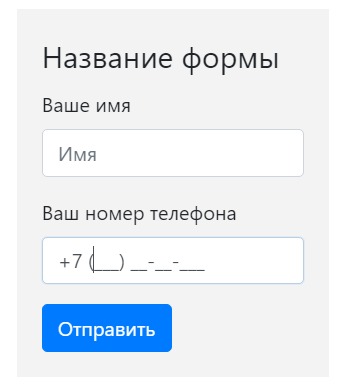
На скриншоте вы видите форму с маской для телефона, когда поле для ввода в фокусе. Это уже отрабатывает плагин jQuery Masked Input.
Инструкция по работе плагина
На GitHub есть подробная инструкция по работе плагина jQuery Masked Input. Между тегами <script>..</script> напишем простой и короткий код.
Первым делом пропишем стандартную форму
$(document).ready(function()
для того, чтобы скрипт начинал работать, только после того, как вся структура DOM всех элементов загрузилась и была готова. Находим на сайте функцию .mask, которая как раз и позволяет нам сделать определённую маску, используя которую, мы можем заставить пользователя, ввести нужную нам информацию.
Из примера на сайте, возьмем маску для телефона.
$("#phone").mask("(999) 999-9999");
Пропишем в input для телефона у нашей формы id=»phone», он должен совпадать с #phone в параметрах плагина. Затем указываем свою маску:
$("#phone").mask("+7 (999) 99-99-999");
В итоге наш код будет таким:
<script>

    $(document).ready(function() {

    $("#phone").mask("+7 (999) 99-99-999");

  });

</script>
Теперь пользователь может вводить в поле для телефона только цифры, в определенном количестве и порядке. Для гибкой маски этот плагин не подойдет.
Посмотреть как работает маска при вводе телефона можете здесь:
Демо-пример
-

Создано 04.07.2018 10:19:56
-
Михаил Русаков


Копирование материалов разрешается только с указанием автора (Михаил Русаков) и индексируемой прямой ссылкой на сайт (http://myrusakov.ru)!
Добавляйтесь ко мне в друзья ВКонтакте: http://vk.com/myrusakov.
Если Вы хотите дать оценку мне и моей работе, то напишите её в моей группе: http://vk.com/rusakovmy.
Если Вы не хотите пропустить новые материалы на сайте,
то Вы можете подписаться на обновления: Подписаться на обновления
Если у Вас остались какие-либо вопросы, либо у Вас есть желание высказаться по поводу этой статьи, то Вы можете оставить свой комментарий внизу страницы.
Если Вам понравился сайт, то разместите ссылку на него (у себя на сайте, на форуме, в контакте):
-
Кнопка:
Она выглядит вот так:
-
Текстовая ссылка:
Она выглядит вот так: Как создать свой сайт
- BB-код ссылки для форумов (например, можете поставить её в подписи):

An input mask is a string expression that demonstrates the format of a valid user input value or we can say that it constraints user input. This is very useful if there are certain inputs in forms that require validation. In this article, we will learn how to apply an input mask for validating a phone number in an input element using jQuery.
There are two approaches that can be taken here:
Approach 1: Using the jQuery inputmask plugin, there are three input fields defined in the following example, each having a class of first-phone, second-phone and third-phone respectively. We select these elements using the jQuery class selector [$(“.class-name”)] and then apply the inputmask() method from the inputmask plugin on each input element. The parameter of this inputmask() method takes the specified string expression to constraint the user input to. In this case, we set three different formats of phone numbers for the three input fields.
CDN Link:
<script src=”https://cdnjs.cloudflare.com/ajax/libs/jquery.inputmask/5.0.7/jquery.inputmask.min.js”></script>
Note: This link must be included in the index page to utilise the jQuery inputmask plugin and thus implement all its functionalities.
Syntax:
$(document).ready(function(){

    // A static mask
    $(selector).inputmask("99-9999999");

    // Mask which specifies options
    $(selector).inputmask({"mask": "(999)-999-9999"});
});
Example: Below example illustrates the use of jQuery Input Mask Phone Number Validation using .inputmask() plugin.
HTML
<!DOCTYPE html>
<html>
<head>
<script src=
</script>
<script src=
</script>
<style>
body {
text-align: center;
}
h1 {
color: green;
font-size: 40px;
}
p {
font-size: 30px;
font-weight: bold;
}
div:not(:last-child) {
margin-bottom: 2rem;
}
</style>
</head>
<body>
<h1>GeeksForGeeks</h1>
<p>jQuery - Input Mask Phone Number Validation</p>
<form>
<div>
<label>Phone Number 1:</label>
<input type="text" name="phone"
class="first-phone"
placeholder="(999)-999-9999" />
</div>
<div>
<label>Phone Number 2:</label>
<input type="text" name="phone"
class="second-phone"
placeholder="(99)-9999-9999" />
</div>
<div>
<label>Phone Number 3:</label>
<input type="text" name="phone"
class="third-phone"
placeholder="+99-9999999999" />
</div>
</form>
<script type="text/javascript">
$(document).ready(function () {
$(".first-phone").inputmask("(999)-999-9999");
$(".second-phone").inputmask("(99)-9999-9999");
$(".third-phone").inputmask("+99-9999999999");
});
</script>
</body>
</html>
Output:

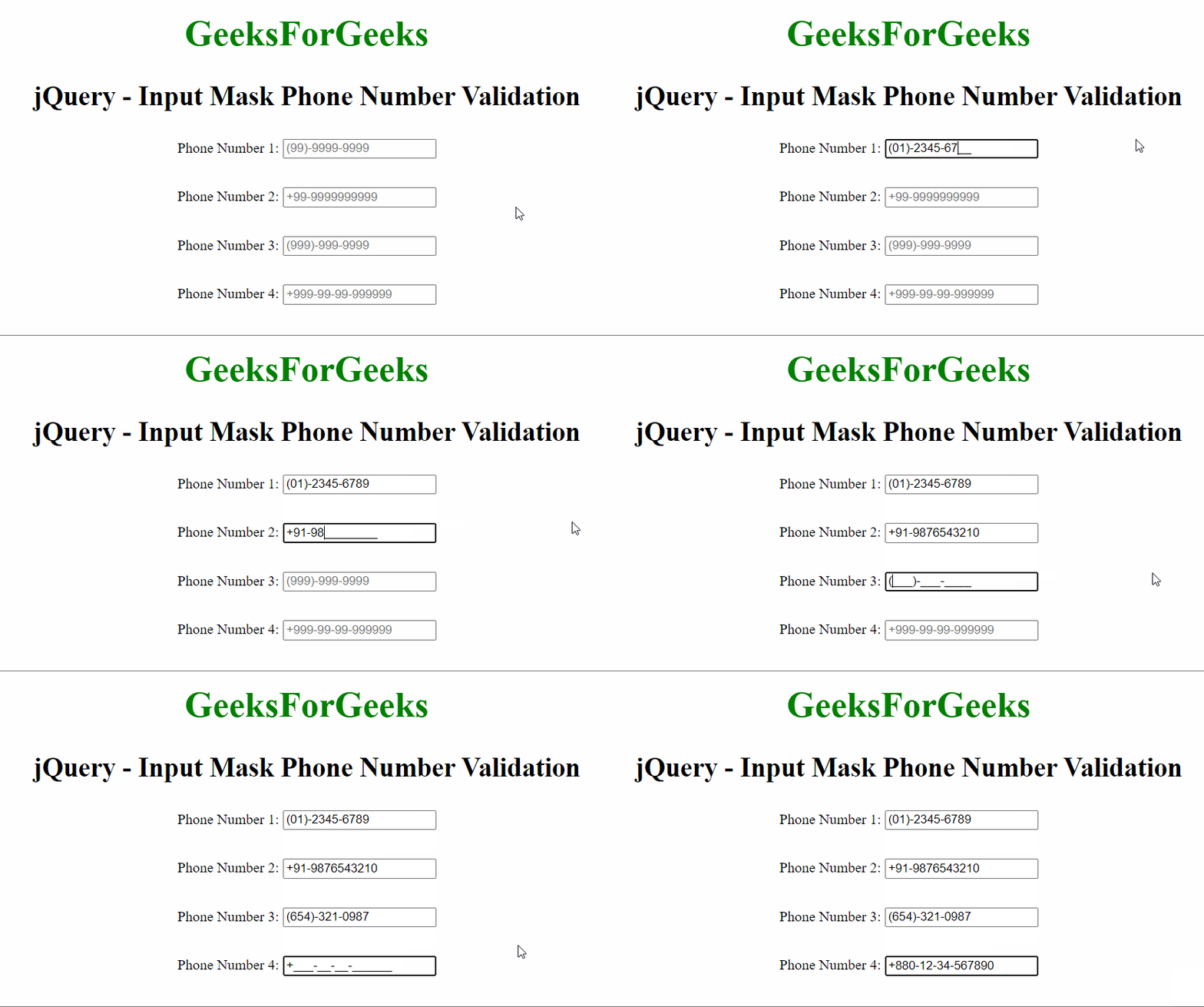
Approach 2: Using the jQuery maskedinput plugin. There are four input fields defined in the following example, each having a class of first-phone, second-phone, third-phone and fourth-phone respectively. We select these elements using the jQuery class selector [$(“.class-name”)] and then apply the mask() method from the maskedinput plugin on each input element. The parameter of this mask() method takes the specified string expression to constraint the user input to. In this case, we set four different formats of phone numbers for the four input fields.
CDN Link:
<script src=
“https://cdnjs.cloudflare.com/ajax/libs/jquery.maskedinput/1.4.1/jquery.maskedinput.min.js”>
</script>
Note: This link must be included in the index page to utilise the jQuery maskedinput plugin and thus implement all its functionalities.
Syntax:
$(document).ready(function(){
    $(selector).mask("99-9999999");
});
Example: Below is the example that illustrates the use of JQuery Input Mask Phone Number Validation using .mask() plugin.
HTML
<!DOCTYPE html>
<html>
<head>
<script src=
</script>
<script src=
</script>
<style>
body {
text-align: center;
}
h1 {
color: green;
font-size: 40px;
}
p {
font-size: 30px;
font-weight: bold;
}
div:not(:last-child) {
margin-bottom: 2rem;
}
</style>
</head>
<body>
<h1>GeeksForGeeks</h1>
<p>jQuery - Input Mask Phone Number Validation</p>
<form>
<div>
<label>Phone Number 1:</label>
<input type="text" name="phone"
class="first-phone"
placeholder="(99)-9999-9999" />
</div>
<div>
<label>Phone Number 2:</label>
<input type="text" name="phone"
class="second-phone"
placeholder="+99-9999999999" />
</div>
<div>
<label>Phone Number 3:</label>
<input type="text" name="phone"
class="third-phone"
placeholder="(999)-999-9999" />
</div>
<div>
<label>Phone Number 4:</label>
<input type="text" name="phone"
class="fourth-phone"
placeholder="+999-99-99-999999" />
</div>
</form>
<script type="text/javascript">
$(document).ready(function () {
$(".first-phone").mask("(99)-9999-9999");
$(".second-phone").mask("+99-9999999999");
$(".third-phone").mask("(999)-999-9999");
$(".fourth-phone").mask("+999-99-99-999999");
});
</script>
</body>
</html>
Output:
An input mask is a string expression that demonstrates the format of a valid user input value or we can say that it constraints user input. This is very useful if there are certain inputs in forms that require validation. In this article, we will learn how to apply an input mask for validating a phone number in an input element using jQuery.
There are two approaches that can be taken here:
Approach 1: Using the jQuery inputmask plugin, there are three input fields defined in the following example, each having a class of first-phone, second-phone and third-phone respectively. We select these elements using the jQuery class selector [$(“.class-name”)] and then apply the inputmask() method from the inputmask plugin on each input element. The parameter of this inputmask() method takes the specified string expression to constraint the user input to. In this case, we set three different formats of phone numbers for the three input fields.
CDN Link:
<script src=”https://cdnjs.cloudflare.com/ajax/libs/jquery.inputmask/5.0.7/jquery.inputmask.min.js”></script>
Note: This link must be included in the index page to utilise the jQuery inputmask plugin and thus implement all its functionalities.
Syntax:
$(document).ready(function(){

    // A static mask
    $(selector).inputmask("99-9999999");

    // Mask which specifies options
    $(selector).inputmask({"mask": "(999)-999-9999"});
});
Example: Below example illustrates the use of jQuery Input Mask Phone Number Validation using .inputmask() plugin.
HTML
<!DOCTYPE html>
<html>
<head>
<script src=
</script>
<script src=
</script>
<style>
body {
text-align: center;
}
h1 {
color: green;
font-size: 40px;
}
p {
font-size: 30px;
font-weight: bold;
}
div:not(:last-child) {
margin-bottom: 2rem;
}
</style>
</head>
<body>
<h1>GeeksForGeeks</h1>
<p>jQuery - Input Mask Phone Number Validation</p>
<form>
<div>
<label>Phone Number 1:</label>
<input type="text" name="phone"
class="first-phone"
placeholder="(999)-999-9999" />
</div>
<div>
<label>Phone Number 2:</label>
<input type="text" name="phone"
class="second-phone"
placeholder="(99)-9999-9999" />
</div>
<div>
<label>Phone Number 3:</label>
<input type="text" name="phone"
class="third-phone"
placeholder="+99-9999999999" />
</div>
</form>
<script type="text/javascript">
$(document).ready(function () {
$(".first-phone").inputmask("(999)-999-9999");
$(".second-phone").inputmask("(99)-9999-9999");
$(".third-phone").inputmask("+99-9999999999");
});
</script>
</body>
</html>
Output:
Approach 2: Using the jQuery maskedinput plugin. There are four input fields defined in the following example, each having a class of first-phone, second-phone, third-phone and fourth-phone respectively. We select these elements using the jQuery class selector [$(“.class-name”)] and then apply the mask() method from the maskedinput plugin on each input element. The parameter of this mask() method takes the specified string expression to constraint the user input to. In this case, we set four different formats of phone numbers for the four input fields.
CDN Link:
<script src=
“https://cdnjs.cloudflare.com/ajax/libs/jquery.maskedinput/1.4.1/jquery.maskedinput.min.js”>
</script>
Note: This link must be included in the index page to utilise the jQuery maskedinput plugin and thus implement all its functionalities.
Syntax:
$(document).ready(function(){
    $(selector).mask("99-9999999");
});
Example: Below is the example that illustrates the use of JQuery Input Mask Phone Number Validation using .mask() plugin.
HTML
<!DOCTYPE html>
<html>
<head>
<script src=
</script>
<script src=
</script>
<style>
body {
text-align: center;
}
h1 {
color: green;
font-size: 40px;
}
p {
font-size: 30px;
font-weight: bold;
}
div:not(:last-child) {
margin-bottom: 2rem;
}
</style>
</head>
<body>
<h1>GeeksForGeeks</h1>
<p>jQuery - Input Mask Phone Number Validation</p>
<form>
<div>
<label>Phone Number 1:</label>
<input type="text" name="phone"
class="first-phone"
placeholder="(99)-9999-9999" />
</div>
<div>
<label>Phone Number 2:</label>
<input type="text" name="phone"
class="second-phone"
placeholder="+99-9999999999" />
</div>
<div>
<label>Phone Number 3:</label>
<input type="text" name="phone"
class="third-phone"
placeholder="(999)-999-9999" />
</div>
<div>
<label>Phone Number 4:</label>
<input type="text" name="phone"
class="fourth-phone"
placeholder="+999-99-99-999999" />
</div>
</form>
<script type="text/javascript">
$(document).ready(function () {
$(".first-phone").mask("(99)-9999-9999");
$(".second-phone").mask("+99-9999999999");
$(".third-phone").mask("(999)-999-9999");
$(".fourth-phone").mask("+999-99-99-999999");
});
</script>
</body>
</html>
Output:
На этом уроке с помощью плагина masked input рассмотрим процесс создания различных масок ввода текстовым элементам формы.
Назначение плагина masked input
Плагин masked input предназначен для установления маски ввода элементу input с помощью кода JavaScript. Данный плагин для своего функционирования требует наличие подключённой библиотеки jQuery. Скачать плагин jquery.maskedinput.js (jquery.maskedinput.min) можно посредством следующей ссылки:
Демо Скачать maskedInput
Подключение плагина
После того как Вы скачали этот плагин (файл js), его необходимо подключить. Это осуществляется с помощью элемента script:
<!-- Подключение библиотеки jQuery -->
<script src="jquery.js"></script>
<!-- Подключение jQuery плагина Masked Input -->
<script src="jquery.maskedinput.min.js"></script>
Создание HTML маски ввода
Создания маски ввода осушествляется в js коде с помощью следующих знаков:
- Цифра
9– соответствует цифре от 0 до 9. - Символ
a– представляет собой любой английский символ (A-Z, a-z). - Знак
*— представляет собой любой алфавитно-цифровой символ (A-Z, a-z, 0-9).
Например рассмотрим процесс создания маски ввода телефона для элемента input, имеющего id="phone":
<!--HTML элемент, который будет иметь маску ввода телефонного номера  -->
<input  id="phone" type="text">
<script>
//Код jQuery, установливающий маску для ввода телефона элементу input
//1. После загрузки страницы,  когда все элементы будут доступны выполнить...
$(function(){
  //2. Получить элемент, к которому необходимо добавить маску
  $("#phone").mask("8(999) 999-9999");
});
</script>

Внимание: По умолчанию в качестве заполнителя маски используется знак нижнего подчеркивания (‘_’).
Если в качестве заполнителя Вы хотите использовать что-то другое, то его можно указать посредством параметра placeholder следующим образом:
<!--HTML элемент, который будет иметь заполнитель дд.мм.гггг -->
<input  id="date" type="text">
<!--HTML элемент, который будет иметь в качестве заполнителя пробел -->
<input  id="index" type="text">
<script>
$(function() {
  //задание заполнителя с помощью параметра placeholder
  $("#date").mask("99.99.9999", {placeholder: "дд.мм.гггг" });
  //задание заполнителя с помощью параметра placeholder
  $("#index").mask("999999", {placeholder: " " });
});
</script>

Кроме placeholder данный плагин имеет ещё параметр completed. Он предназначен для задания действий, которые будут выполнятся после того как пользователь завершит ввод маски ввода.
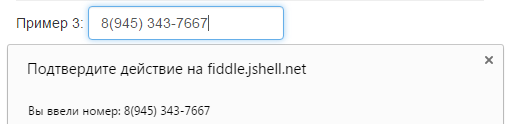
Например, выведем с помощью метода alert сообщение пользователю, когда он завершит ввод маски телефона:
<!-- Ввод номера телефона осуществляется с помощью маски  -->
<input  id="phone" type="text">
<script>
$(function(){
  //Использование параметра completed
  $("#phone").mask("8(999) 999-9999", {
    completed: function(){ alert("Вы ввели номер: " + this.val()); }
  });
});
</script>
Иногда бывают такие ситуации, когда одна часть маски является обязательной для заполнения, а другая часть нет. Чтобы это указать, в Masked Input используется знак '?'. Этот знак является специальным символом, после которого необходимо разместить часть маски необязательной для заполнения.
Например, пользователю необходимо ввести число от 0 до 0.99. При этом обязательным для заполнения является указание хотя бы одного знака после запятой.
<!-- Ввод номера телефона осуществляется с помощью маски  -->
<input  id="number" type="text">
<script>
jQuery(function($){
  //создания своего специального символа для маски
  $("#number").mask("0.9?9");
});
</script>

Настройка маски ввода Masked Input
Плагин Masked Input позволяет использовать в маске кроме предопределенных специальных знаков (9, a, *) свои собственные.
Например, создадим для маски специальный символ ~, который при вводе должен быть заменён на знак (+) или минус (-).
<!-- HTML элемент, имеющий маску телефона -->
<input  id="number" type="text">
<script>
jQuery(function($){
  //создания специального символа для маски
  $.mask.definitions['~']='[+-]';
  $("#number).mask("~9.99");
});
</script>

Например, создадим маску для ввода CSS цвета в шестнадцатеричном формате:
<!-- HTML элемент, имеющий маску для ввода цвета в шестнадцатиричном формате -->
<input  id="color" type="text">
<script>
jQuery(function($){
  //создания специального символа h для маски
 $.mask.definitions['h']='[A-Fa-f0-9]';
  $("#color).mask("#hhhhhh");
});
</script>

Пример создания маски ввода телефона
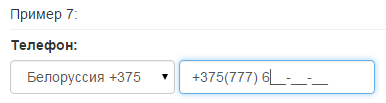
Рассмотрим пример создания маски для ввода телефона в зависимости от выбранной страны:
<div class="form-group">
  <label for="phone">Телефон: </label>
  <select id="country" class="form-control">
    <option value="ru"><img src="">Россия +7</option>
    <option value="ua">Украина +380</option>
    <option value="by">Белоруссия +375</option>
  </select>
  <input id="phone" type="text" class="form-control">
</div>

<script>
jQuery (function ($) {
  $(function() {
    function maskPhone() {
      var country = $('#country option:selected').val();
      switch (country) {
        case "ru":
          $("#phone").mask("+7(999) 999-99-99");
          break;
        case "ua":
          $("#phone").mask("+380(999) 999-99-99");
          break;
        case "by":
          $("#phone").mask("+375(999) 999-99-99");
          break;
      }
    }
    maskPhone();
    $('#country').change(function() {
      maskPhone();
    });
  });
});
</script>
jQuery Masked Input Plugin позволяет создавать произвольные маски для вводимых данных в форму, например: дата, телефон, серийный номер и т.д.
Установка:
Подключаем библиотеку jQuery и плагин jquery.maskedinput:
- Скачать: jquery.maskedinput.js
- Скачать: jquery.maskedinput.min.js
Далее для инпута c id=»phone» создаем маску:
|
$(«#phone»).mask(«+7 (999) 999 — 9999»); |
Значения для создания маски:
a — буквы алфавита (A-Z,a-z)
9 — цифры (0-9)
* — буквы и цифры (A-Z,a-z,0-9)
Настройки:
По умолчанию если пользователь не завершил ввод данных, они сбрасываются. Для отмены убираем очистку поля:
|
$(«#phone»).mask(«+7 (999) 999 — 9999»,{autoclear: false}); |
По умолчанию на место ввода значения ставится знак подчеркивания, для его замены нужно прописать свой placeholder:
|
$(«#phone»).mask(«+7 (999) 999 — 9999»,{placeholder:» «}); |
Плагин также может выполнить функцию после завершения ввода:
|
$(«#phone»).mask(«+7 (999) 999 — 9999»,{completed:function(){alert(«ОК!»);}}); |
Пример:
- ПРИМЕР
- HTML
- JS
|
<input placeholder=«Ваш телефон:» id=«phone» type=«text» /> |
|
$(«#phone»).mask(«+7 (999) 999 — 9999»,{autoclear: false, completed:function(){alert(«ОК!»);}}); |
- Опубликовано: 17.07.2018
- Рубрики: Формы
- Метки: jQuery
- 17425 просмотров
Masked Input Plugin for jQuery
Notice: This project is no longer being maintained.
I started this project over 10 years ago to fill a need for a side project I was working on at the time. Nothing ever became of that side project, but this little plugin lived on. Over the years it brought me joy to stumble on sites using this thing. It was super encouraging to hear from people using it in their own products. I tried for a while to maintain it, even after I had moved away from front end web development.
The time has come to officially call it quits. The web has changed(A LOT) and there are better things out there like Cleave.js. I’ll leave this repo up for posterity in an archived state. Thank you to everyone who contributed to or used this plugin over the years.
Overview
This is a masked input plugin for the jQuery javascript library. It allows a user to more easily enter fixed width input where you would like them to enter the data in a certain format (dates,phone numbers, etc). It has been tested on Internet Explorer, Firefox, Safari, Opera, and Chrome. A mask is defined by a format made up of mask literals and mask definitions. Any character not in the definitions list below is considered a mask literal. Mask literals will be automatically entered for the user as they type and will not be able to be removed by the user.The following mask definitions are predefined:
- a — Represents an alpha character (A-Z,a-z)
- 9 — Represents a numeric character (0-9)
- * — Represents an alphanumeric character (A-Z,a-z,0-9)
Usage
First, include the jQuery and masked input javascript files.
<script src="jquery.js" type="text/javascript"></script>
<script src="jquery.maskedinput.js" type="text/javascript"></script>
Next, call the mask function for those items you wish to have masked.
jQuery(function($){
   $("#date").mask("99/99/9999");
   $("#phone").mask("(999) 999-9999");
   $("#tin").mask("99-9999999");
   $("#ssn").mask("999-99-9999");
});
Optionally, if you are not satisfied with the underscore (‘_’) character as a placeholder, you may pass an optional argument to the maskedinput method.
jQuery(function($){
   $("#product").mask("99/99/9999",{placeholder:" "});
});
Optionally, if you would like to execute a function once the mask has been completed, you can specify that function as an optional argument to the maskedinput method.
jQuery(function($){
   $("#product").mask("99/99/9999",{completed:function(){alert("You typed the following: "+this.val());}});
});
Optionally, if you would like to disable the automatic discarding of the uncomplete input, you may pass an optional argument to the maskedinput method
jQuery(function($){
   $("#product").mask("99/99/9999",{autoclear: false});
});
You can now supply your own mask definitions.
jQuery(function($){
   $.mask.definitions['~']='[+-]';
   $("#eyescript").mask("~9.99 ~9.99 999");
});
You can have part of your mask be optional. Anything listed after ‘?’ within the mask is considered optional user input. The common example for this is phone number + optional extension.
jQuery(function($){
   $("#phone").mask("(999) 999-9999? x99999");
});
If your requirements aren’t met by the predefined placeholders, you can always add your own. For example, maybe you need a mask to only allow hexadecimal characters. You can add your own definition for a placeholder, say ‘h’, like so: $.mask.definitions['h'] = "[A-Fa-f0-9]"; Then you can use that to mask for something like css colors in hex with a mask "#hhhhhh".
jQuery(function($){
   $("#phone").mask("#hhhhhh");
});
By design, this plugin will reject input which doesn’t complete the mask. You can bypass this by using a ‘?’ character at the position where you would like to consider input optional. For example, a mask of «(999) 999-9999? x99999» would require only the first 10 digits of a phone number with extension being optional.
Getting the bits
We generally recommend that you use bower to install jquery.maskedinput plugin.
$ bower install --save jquery.maskedinput
Setting up your Developer Environment
jQuery Masked Input uses NodeJS and GruntJS as it’s developer platform and build automation tool.
To get your environment setup correctly, you’ll need nodejs version 0.8.25 or greater installed. You’ll also need to install the grunt command line tool:
$ sudo npm install -g grunt-cli
Once node is installed on your system all that you need to do is install the developer dependencies and run the grunt build:
All of the tests for jQuery Masked Input are run using the jasmine test runner.